













Quatro Mobile App Guide: Play Casino Games on Any Device in 2026
Gaming on the Go with Quatro
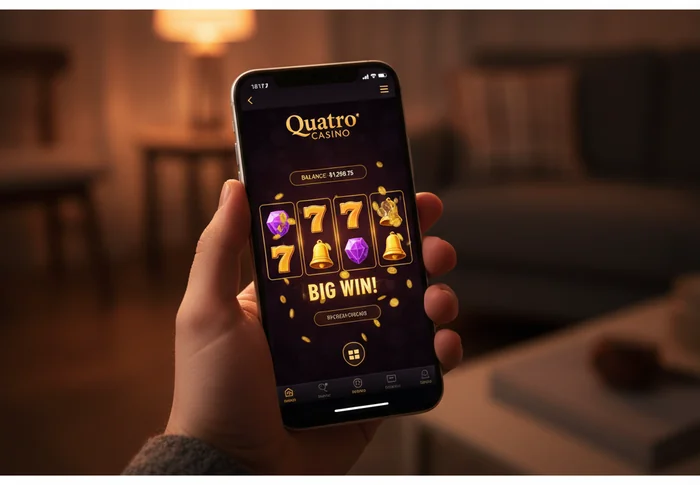
Are you looking for a reliable way to play your favourite casino games without being tied to a desktop screen? The Quatro mobile app puts the full casino experience in your pocket — slots, live dealer tables, banking, and support all accessible from your phone or tablet, wherever you happen to be.
We understand that modern players move fast. Commutes, lunch breaks, evenings on the sofa — your schedule doesn't always allow for a sit-down session at a computer. That's why we've built Quatro Casino's mobile platform to feel genuinely complete, not a trimmed-down version of the real thing. From your first login to your next withdrawal, everything works smoothly on a small screen.
Device Compatibility at Quatro
First, let's understand which devices and operating systems work with our platform. We've designed the experience to cover the widest possible range of hardware, so you're not locked out because of an older phone or a less common setup.
| Platform | Minimum Version | Download | App Size |
|---|---|---|---|
| iOS (iPhone / iPad) | iOS 14.0 or later | Available via App Store | Approx. 85 MB |
| Android | Android 8.0 (Oreo) or later | APK direct download | Approx. 72 MB |
| Windows (PC/Laptop) | Windows 10 or later | Browser-based, no install needed | N/A |
| Mobile Browser | Any modern browser (Chrome, Safari, Firefox) | No download required | N/A |
| Tablet (iOS or Android) | Same as iOS / Android above | App Store or APK | Approx. 85–90 MB |
In simple terms, if your device runs a reasonably current operating system, you're covered. We keep minimum requirements realistic — we're not asking you to upgrade your phone just to spin a slot reel.
What the Quatro App Offers
The Quatro mobile app isn't a shortcut — it's a full-featured environment built around touch interaction. Let's walk through what you actually get when you open it.
Games on Mobile
Our mobile library currently includes over 500 titles optimised specifically for touch screens. This means that game interfaces have been scaled, button sizes adjusted, and control layouts redesigned so that tapping feels as natural as clicking ever did on desktop. You'll find slots, live dealer games, table classics, and video poker all represented.
Three titles that consistently perform well on mobile are Mega Moolah (the progressive jackpot slot with portrait-mode support), Lightning Roulette (which uses a vertical camera layout perfectly suited to phone screens), and Book of Oz (a slot with crisp graphics that load quickly even on 4G connections). These aren't just popular — they've been specifically tested for mobile responsiveness.
Both portrait and landscape orientations are supported across the library. Some players prefer holding their phone upright for slots; others flip to landscape for live table games where the wider view helps. The platform adapts automatically — you won't need to dig through settings to make it work.
Mobile Bonuses
We want to be clear about something players often ask: you don't lose out on bonuses by playing on mobile. Every promotion available on desktop is equally accessible through the app or mobile browser. Welcome offers, reload bonuses, free spin packages — all of them appear in your account regardless of which device you used to claim them.
Beyond parity, we do run mobile-exclusive promotions from time to time. These are offers pushed directly through app notifications and are only redeemable through the mobile platform. Keeping notifications enabled in your device settings means you won't miss these when they go live. Visit our promotions and VIP page to see what's currently available, including any active Quatro mobile bonus offers.
Wagering requirements, validity periods, and eligible games are always the same whether you're on your phone or your laptop. We believe in consistent, transparent terms — no small-print surprises based on how you're connecting.
Banking on Mobile
Depositing and withdrawing from your phone is straightforward. The banking section of the app mirrors the desktop experience, with the same methods available: Visa, Mastercard, Interac, iDebit, Instadebit, ecoPayz, and several other e-wallet options depending on your region. This means that switching from desktop to mobile doesn't mean giving up your preferred payment method.
Mobile-specific conveniences include biometric authentication for login (Face ID on iOS, fingerprint on Android), which speeds up access to your account before making a transaction. Deposits are processed instantly in most cases, while withdrawal timelines depend on the method chosen — e-wallets are typically the fastest route.
The full transaction history, active bonus tracker, and account verification tools are all accessible from the banking section on mobile. You don't need to switch to a computer to manage your account — everything is there in your hand.
How to Download and Get Started
Getting the app onto your device takes only a few minutes. Here's the step-by-step process for each platform.
iOS Download
- Open the App Store on your iPhone or iPad and search for "Quatro Casino".
- Tap Get on the official listing — confirm with Face ID, Touch ID, or your Apple ID password.
- Wait for the download to complete (typically under two minutes on a standard Wi-Fi connection).
- Open the app, tap Log In if you already have an account, or tap Register to create your Quatro account and claim your welcome offer.
Android Download
- Because casino apps are not listed on the Google Play Store, you'll need to download our APK file directly. Visit our app page from your Android browser and tap the Android download button.
- If prompted, go to your device Settings → Security → Unknown Sources and allow installations from your browser. This is a standard step for APK installs and is safe when downloading from our official site.
- Once the APK downloads, tap the file in your notification bar or file manager and select Install.
- Open the app and log in to your account, or register if you're new to the platform.
No download? No problem. If you'd rather not install anything, our full mobile casino runs directly in your phone's browser — Chrome, Safari, or Firefox all work well. Simply navigate to quatrocasino777.com on your mobile browser and the site will automatically load the mobile-optimised version. No app, no APK, no storage used on your device. Everything from games to banking works the same way.
Mobile App vs Desktop: Side by Side
We know some players use both platforms depending on the situation. Here's an honest comparison so you can decide which works best for each occasion.
| Feature | Mobile App | Desktop |
|---|---|---|
| Game Selection | 500+ mobile-optimised titles | Full library, including some desktop-exclusive variants |
| Graphics Quality | Optimised for Retina / AMOLED screens | Full resolution, larger display advantage |
| Loading Speed | Fast on 4G/5G; slight delay on 3G | Fastest on broadband; consistent performance |
| Push Notifications | Yes — real-time bonus and promotion alerts | Browser notifications only (less reliable) |
| Bonuses | All standard offers + mobile-exclusive promotions | All standard offers |
| Payment Methods | Full range including biometric-secured transactions | Full range |
| Live Chat Support | Available in-app, 24/7 | Available on-site, 24/7 |
In simple terms: use the mobile app when you're away from home and want quick access, push notifications, and a touch-native experience. Switch to desktop when you want the largest possible screen for an extended live dealer session or when you're exploring a new game category in detail. Both options connect to the same account, same balance, and same bonuses — so moving between them is seamless.
Performance and Connection Tips
Loading speed on the Quatro mobile platform is a priority we take seriously. On a 4G connection, most slot games load within three to five seconds. On 5G, that drops noticeably. Live dealer streams run at adaptive bitrates, meaning the video quality adjusts automatically to your connection speed without dropping you from the game.
Data usage is moderate — a typical slots session uses roughly the same data as browsing social media. Live dealer games use more, closer to standard video streaming. If you're on a limited mobile data plan, connecting to Wi-Fi before starting a live table session is a practical habit.
The app does not support offline play — real-money casino games require a live connection by nature. However, the app itself launches quickly even after being closed, so reconnecting after a brief interruption is fast. Push notifications continue to work in the background even when the app is closed, so you'll still receive promotion alerts without the app running.
Performance tip: For the smoothest experience, close background apps before starting a live dealer session, keep your device charged above 20% (low battery mode can throttle performance on both iOS and Android), and connect to Wi-Fi when available. These three steps alone make a noticeable difference in stream quality and touch responsiveness.
Ready to Play? Your Next Steps
You now have a clear picture of what mobile gaming at Quatro looks like in 2026 — the devices it supports, the games available, how bonuses work on mobile, and how to get the app onto your phone in minutes. The platform is built for players who want flexibility without compromise.
If you're new, the first step is straightforward: sign up for your Quatro account and your welcome offer will be waiting whether you play on the app or in your browser. If you're already a member, log in now and pick up where you left off — your balance, bonuses, and game history are exactly where you left them.
Download the app, open your browser, or do both at different times — however you choose to play, Quatro is ready when you are.
Frequently Asked Questions
Is there a Quatro Casino app I can download on my phone?
Quatro Casino offers a fully optimized mobile experience accessible directly through your smartphone browser at quatrocasino777.com, meaning there is no separate app download required from the App Store or Google Play. The mobile site loads instantly on both iOS and Android devices and gives you access to the full game library, banking options, and account management without taking up any storage space on your device.
Does Quatro Casino work on iPhone and Android devices?
Yes, Quatro Casino is fully compatible with both iOS and Android operating systems, supporting iPhones running iOS 12 or later and Android devices running version 6.0 or above. The mobile platform automatically adjusts to your screen size and resolution, delivering smooth gameplay whether you are using a smartphone or tablet.
How do I start playing Quatro Casino games on my mobile phone?
Simply open your preferred mobile browser, navigate to quatrocasino777.com, and log in to your existing account or register a new one in under two minutes. For quicker access in the future, you can save the site to your home screen by selecting "Add to Home Screen" in your browser menu, which creates a shortcut that works just like a native app icon.
Can I play slots and table games on the Quatro mobile site?
The Quatro mobile platform gives you access to hundreds of games including video slots, classic slots, blackjack, roulette, and live dealer tables, all optimized for touch-screen controls. Games are powered by leading software providers and load directly in your browser within seconds, with no plugins or additional software needed to get started.
Is it safe to make deposits and withdrawals through the Quatro mobile site?
All transactions made through the Quatro mobile site at quatrocasino777.com are protected by 128-bit SSL encryption, the same security standard used by major financial institutions worldwide. You can deposit and withdraw using the same payment methods available on desktop, including credit cards and e-wallets, with processing times consistent across both platforms.